 Tour Our Campus
 Online Courses


AI Guide
🤖 AI Tools Guide
Curated AI tools for faculty and students, organized by department. Updated monthly with classroom activity ideas.
Last Updated: January 2026Recording Arts
Music production, audio engineering, and sound design tools
AI music generator that creates full songs with vocals and instrumentation from text prompts. Produces surprisingly commercial-quality results across genres.
💡 Classroom Activity
Have students generate a song, then analyze why it sounds "AI" - identify what's missing emotionally. Then have them re-record elements to improve it.
Competitor to Suno with arguably more realistic vocals. Excels at specific genres and allows lyric input for more control over the output.
💡 Classroom Activity
Compare Suno vs Udio outputs using identical prompts. Discuss which sounds more "human" and why. Great critical listening exercise.
Google's AI music generator from AI Test Kitchen. Create instrumentals and loops from text prompts. Great for quick background music, sound design elements, and experimentation.
💡 Classroom Activity
Generate background music for a student video project using only text descriptions. Compare Google's output to Suno/Udio — which excels at what?
AI-powered mastering that analyzes your track and applies professional mastering. Industry standard for quick masters. Also offers distribution.
💡 Classroom Activity
Master a student mix with LANDR, then manually master the same track. Compare A/B - when does AI win? When does human win?
Best-in-class stem separation. Isolates vocals, drums, bass, guitar, keys, and more from any track. Essential for remixing and sampling.
💡 Classroom Activity
Extract stems from a classic track. Have students remix it with their own elements. Discuss ethics of sampling vs. AI extraction.
Apple's iPad App of the Year. Stem separation PLUS AI chord detection, pitch/tempo shifting, smart metronome, and voice studio. Perfect for practice, transcription, and learning songs.
💡 Classroom Activity
Import a complex song, use AI chord detection to learn it, slow it down 50%, practice along with isolated backing tracks. Great for ear training and transcription skills.
Upload any voice recording and AI transforms it to studio quality. Removes background noise, echo, and enhances clarity dramatically.
💡 Classroom Activity
Record voice on a phone in a noisy environment. Process through Adobe, then compare to proper studio recording. Discuss when "good enough" is actually good enough.
Industry-standard suite with AI-assisted mastering (Ozone) and audio repair (RX). "Master Assistant" analyzes and suggests settings automatically.
💡 Classroom Activity
Use RX to "rescue" a badly recorded track (add noise, clipping artificially). Teaches both what NOT to do and how AI can save it.
Beat Production
Beat making, drum programming, loops, and music production tools
Generate complete beats and instrumentals from text prompts. Great for quick inspiration, reference tracks, and understanding genre conventions.
💡 Classroom Activity
Generate 5 AI beats in different genres, then recreate them from scratch in your DAW. Teaches genre conventions and production techniques.
Free cloud DAW with AI-powered tools: SongStarter generates beats from prompts, AI mastering, vocal pitch correction, and collaboration features.
💡 Classroom Activity
Use SongStarter to generate a beat foundation, then customize and build on it. Perfect intro to AI-assisted workflow.
Industry-standard sample library with AI-powered search. Find samples by description, mood, or reference track. Create AI-generated drum patterns with CoSo.
💡 Classroom Activity
Build a beat using only AI-found samples from Splice. Compare to manually browsing — discuss workflow efficiency vs. happy accidents.
AI that composes royalty-free background music based on mood and genre. Customize length, intensity, and instruments. Great for scoring video content.
💡 Classroom Activity
Score a short video using AI-generated music, then create original score for the same video. Compare emotional impact and discuss when each approach works.
Premium sound design tools with AI-powered features. Arcade generates endless loops that respond to your input. Industry-standard for modern production.
💡 Classroom Activity
Use Arcade's AI-responsive loops to build a track. Teaches how modern producers combine AI tools with traditional production.
AI drum pattern generator. Describe the vibe you want, get MIDI drum patterns instantly. Export to any DAW for customization.
💡 Classroom Activity
Generate AI drum patterns, import to DAW, then humanize and customize. Teaches the difference between quantized AI and human feel.
Film Production
Video editing, VFX, and visual storytelling tools
Leading AI video generation. Creates video from text or images with professional camera control. Used in actual film production for previsualization.
💡 Classroom Activity
Create a "previz" for a student film using AI-generated shots. Then shoot the actual scene and compare. Teaches shot planning efficiently.
Google's flagship video AI. Generates 1080p/4K videos over 1 minute with synchronized dialogue, sound effects, and ambient audio. Best physics understanding of any AI video tool.
💡 Classroom Activity
Generate a 30-second scene with dialogue using only text prompts. Analyze how AI handles continuity, physics, and lip sync vs. traditional filmmaking.
Google's AI filmmaking platform combining Veo + Imagen. Generate cinematic scenes with camera movements, sound design, narrative flow, and asset management. Built for actual film production.
💡 Classroom Activity
Create a complete short scene using Flow — establishing shot, dialogue, close-ups. Compare workflow to traditional storyboard → shoot → edit pipeline.
Industry-standard NLE now with AI features: auto scene detection, speech-to-text captions, auto color match, and AI-powered audio enhancement.
💡 Classroom Activity
Import raw footage, use AI scene detection to auto-organize. Compare time spent vs. manual logging. When to trust AI vs. do it yourself?
Best AI voice generation available. Clone voices, generate narration, create character dialogue. Scarily realistic with emotional range.
💡 Classroom Activity
Create a short film with AI-generated temp voices, then re-record with actors. Compare emotional impact. Discuss deepfake ethics.
AI upscaling and enhancement for video. Turn 720p to 4K, 30fps to 60fps, remove noise. Essential for restoring old footage.
💡 Classroom Activity
Restore old family footage or public domain films. Discuss the ethics and artistry of "improving" historical media.
Premier AI image generation. Perfect for concept art, storyboards, mood boards, and production design exploration.
💡 Classroom Activity
Generate concept art for a short film's production design. Use as reference when actually building sets/choosing locations.
AI image aggregator with access to 100+ models (Stable Diffusion, SDXL, custom models). More control than Midjourney — train custom models, use ControlNet, and fine-tune outputs.
💡 Classroom Activity
Compare the same prompt across different AI models. Discuss why results vary and which models suit different styles (photorealistic vs. illustration vs. concept art).
Google's image AI with powerful editing. Change hairstyles, backdrops, mix multiple photos seamlessly. Multi-image fusion, subject consistency, and SynthID watermarking for authenticity.
💡 Classroom Activity
Create character concepts with consistent faces across multiple images/poses. Essential skill for visual development and pre-production.
Animation & Visual Effects
3D modeling, character animation, motion capture, VFX, and rendering
Revolutionary AI VFX tool. Automatically animates, lights, and composites CG characters into live-action footage. Does 80% of VFX work automatically.
💡 Classroom Activity
Shoot simple live-action footage, replace actor with CG character using Wonder Studio. Compare to traditional VFX pipeline — what takes weeks now takes hours.
AI motion capture from regular video — no suits, no markers, no special equipment. Upload video, get 3D animation data. Export to Maya, Blender, Unity, Unreal.
💡 Classroom Activity
Record yourself acting out a scene with your phone. Convert to motion capture, apply to 3D character. Democratizes what was $100K+ technology.
AI-assisted animation with physics simulation. Pose characters and AI calculates realistic physics, balance, and secondary motion. Makes animation faster and more believable.
💡 Classroom Activity
Create a fight scene or stunt sequence. Let AI handle physics while you focus on timing and composition. Compare to manual keyframing.
Markerless motion capture using just smartphone cameras. Multi-person tracking, real-time preview, direct export to game engines and DCCs.
💡 Classroom Activity
Set up a multi-camera mocap session with phones. Capture group performance, apply to multiple characters. Learn professional mocap workflows with zero budget.
AI creative suite with powerful VFX tools: green screen removal, rotoscoping, object removal, inpainting, style transfer, and video generation. Essential for modern VFX.
💡 Classroom Activity
Use AI to rotoscope a complex shot that would take hours manually. Then use inpainting to remove objects. Essential modern VFX skills.
Industry-standard free 3D software now with AI addons: AI texture generation, AI-assisted modeling, automatic rigging, and more. The foundation of 3D education.
💡 Classroom Activity
Model a character, use AI addon to auto-rig it, then animate. Compare AI rigging vs. manual rigging — understand what AI does under the hood.
AI image breeding and generation. Blend images together, evolve characters, create unique designs by "breeding" visual traits. Great for character concept development.
💡 Classroom Activity
Create a character lineup by breeding images — protagonist, antagonist, sidekicks. Teaches iterative design and visual development processes.
Professional motion capture ecosystem. Free AI video mocap, affordable sensor suits, face capture, and hand tracking. Full pipeline from capture to animation.
💡 Classroom Activity
Compare AI video mocap vs. sensor-based mocap. When does each excel? Understand the trade-offs in professional production.
Game Audio
Interactive sound design, game engines, and adaptive audio
Industry-standard audio middleware for games. Where the REAL game audio jobs are. Now includes AI-assisted sound generation and adaptive music systems.
💡 Classroom Activity
Build an interactive soundscape that responds to player health/state in a Unity project. This is the ACTUAL job skill employers want.
Alternative to Wwise, used in major titles. More intuitive interface, excellent for beginners. Seamless Unity/Unreal integration.
💡 Classroom Activity
Recreate the audio for a classic game scene (Mario coin, Zelda chest). Implement in FMOD with proper randomization and layering.
AI audio generation from Stability AI. Creates music, sound effects, and ambient audio from text. Great for rapid prototyping game audio.
💡 Classroom Activity
Generate placeholder SFX with AI for a game prototype, then replace with custom recorded/designed sounds. Compare quality and discuss workflow.
Generate any sound effect from text description. "Footsteps on gravel in a cave" - get multiple variations instantly. Game-changer for prototyping.
💡 Classroom Activity
Generate AI sound effects, then record the same sounds in real life (foley). A/B test in a game - which sounds better? When does each win?
THE platforms where game audio lives. Audio designers MUST understand these engines. Both now include AI-assisted tools for spatial audio and optimization.
💡 Classroom Activity
Build a 3D environment and implement spatial audio - footsteps that change on different surfaces, ambient zones, reverb areas.
General Creative Tools
AI assistants, writing, and productivity tools for all departments
AI assistants for brainstorming, writing scripts, generating lyrics, solving technical problems, and learning new tools quickly.
💡 Classroom Activity
Use AI to generate 10 story concepts, then have students critique which ones feel "AI" vs. interesting. Develop the best one together.
Google's flagship AI. Gateway to ALL Google AI tools — Veo video, Imagen images, code, research. Deep integration with Google Workspace (Docs, Sheets, Slides).
💡 Classroom Activity
Use Gemini to research a topic, generate images for a presentation, AND create the Google Slides — all in one workflow. Show the power of integration.
AI research assistant that reads YOUR documents (PDFs, websites, videos) and answers questions about them. Generates AI podcasts from your content. Mind-blowing for research.
💡 Classroom Activity
Upload course materials and have NotebookLM generate a podcast episode explaining the concepts. Students learn content creation AND the subject matter.
AI search that provides sourced answers. Perfect for researching techniques, gear, and staying current on industry trends.
💡 Classroom Activity
Research a piece of gear or technique using Perplexity vs. traditional Google. Compare information quality and speed.
AI super-assistant aggregating multiple LLMs (GPT-4, Claude, Gemini) in one interface. Includes image generation, web search, code execution, and document analysis. Great for comparing AI models.
💡 Classroom Activity
Ask the same creative question to different AI models (GPT vs Claude vs Gemini). Compare responses — which is more creative? More accurate? More useful for your project?
Project management and note-taking with AI. Great for organizing productions, writing treatments, and collaboration.
💡 Classroom Activity
Use Notion to manage a group project from pre-production to delivery. Real-world production workflow experience.
🎬 Featured Project: AI Music Video Pipeline
A complete multi-tool project that teaches real production workflow using AI tools.
💡 Why This Project Works:
- Multi-tool literacy — Students learn 4+ AI tools in one project
- Real workflow — Mirrors actual production pipelines
- Portfolio piece — Creates shareable, impressive final output
- Critical thinking — Forces decisions about when AI helps vs. hinders
- Cross-department — Works for Recording Arts AND Film students
🗣️ Lip Sync & Character Animation Tools
Essential tools for the music video project — make characters sing!
Hedra
Free tierUpload a character image + audio, get lip-synced video. Best quality for static images. Very popular on social media.
HeyGen
$24/moProfessional avatar video creation with lip sync. Create talking head videos, AI avatars, and translations. Industry standard.
D-ID
Free tierCreate talking avatars from photos. Good for presentations, explainers, and character animation. Easy to use.
LipSync Studio
Free tierSimple browser-based lip sync. Upload image + audio, control which parts animate. Great for quick experiments.
⚡ Quick Reference
In The News

Top 13 audio engineering schools for 2024
We are thrilled to have been mentioned as one of the top Audio Recording Schools in 2024 by Voices. Check out the full article HERE.
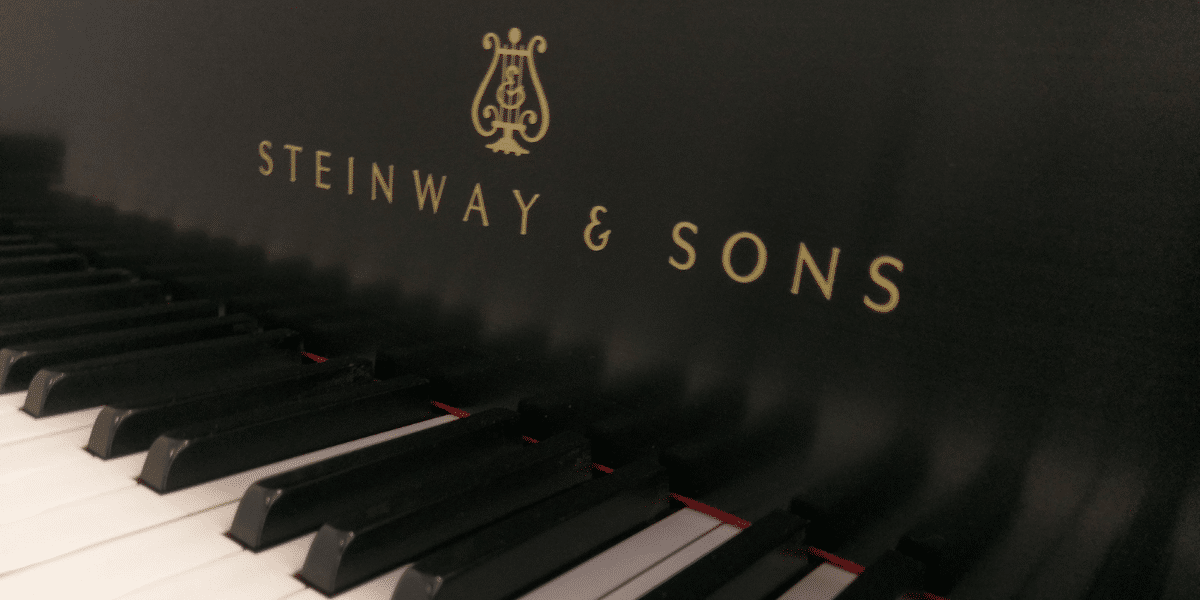
MediaTech Institute's Steinway Grand
A music production instructor recorded stunning samples from our beautiful Steinway Grand in Dallas, TX. Check out the full article HERE.

Meet a MediaTech Graduate Cinematographer
Joshua Dupiton is a successful Cinematographer & Video Editor after graduating MediaTech Institute! Check out the full article HERE.
Check out our video tour of the Dallas Campus.
Dallas Campus